Step 1: Click Firefox Browser icon, make it running.
Option A:
Step 2: Navigate, Tools>Options>Content Tab>.
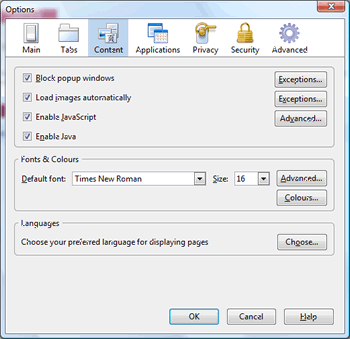
Step 3: Under Fonts & Colors, just increase font size and hit OK.
Option B:
Step 2: Navigate, View>Zoom>Zoom in, repeat until the desired font size in achieved.
Tips: To enlarge the font size you also can by the keyboard 'Ctrl + +', make smaller by 'Ctrl + -', and 'Ctrl + 0' makes the font normal.
