SFD is a yearly celebration for Software Freedom! Every year there are thousands teams organizing Software Freedom Day in different countries and cities.
Check the map to find out the SFD event(s) around your area.


Use Internet Connection Sharing (ICS).
Use a router.
First, you need one computer, called the host computer, that is connected to the Internet and that has a separate connection to the other computers on your network. You enable ICS on the Internet connection. The other computers on your network then connect to the host computer, and from there to the Internet through the host computer's shared Internet connection.
Set Up the Computer That Will Share the Connection (Host computer)
Start with the computer that will share the Internet connection. First set up your Internet connection,and then use the Network Setup Wizard to configure the computer by taking the following steps
Create and test an Internet connection using the information in the “Connecting to the Internet”.
Click on start Right-click Network and choose Properties from the context menu. You’ll see the Network and Sharing Center window.Click the Manage Network Connection link.


Setting Up a Client Computer
Next, set up the first of your client computers. Make sure the Internet connection is still open on the computer you set up to share it, and then take the following steps
Open the Internet Options applet in the Control Panel. You’ll see the Internet Properties dialog box. Select the Connections tab.
Choose the Never Dial a Connection option.Click LAN Settings to display the Local Area Network (LAN) Settings dialog box.
Check the Automatically Detect Settings and the Use Automatic Configuration Script
options. Clear the Use a Proxy Server for Your LAN option. Click OK twice to change
the settings.
NOTE: You may have to reboot or at least log out and then back into the system to make the connection work. Windows may not acknowledge the availability of the shared connection otherwise.
You have windows XP and linux on the same hard disk and you choose GRUB as boot loader.At boot time you see a menu to choose windows or linux.
But one day you reinstall Windows XP and it rewrites your MBR and the menu has gone, now you only can boot windows.
What to do:
Put the redhat boot disk you created on the installation on the floppy drive, boot the system and run grub command
Remember that for grub (hd0,1) means hda (primary controller master), second partition.
Now we need to tell grub where are the grub files:
If you know where they are, type something like:
root (hd0,1)
else if you have no idea, type:
find /boot/grub/stage1
and then the root command with the correct parameters:
setup (hd0)
to install it on hd0, that is MBR of the first HD.
type quit and reboot.
The menu will appear again.
If you want to make some changes to the boot menu, you must edit the file: /boot/grub/menu.lst
A sample menu.lst file is this:


W32/Autorun.jamesgo is a worm that can spreads via removable media storage and execute itself via autorun.inf file.
Risk Level: Low
File Size: Varies
Affected System: Windows
Common Symptoms:
1. Automatically opens MS Word
2. Displays Open(jamesgo.dll) when checking Drive C: properties

There are two sections - eth0 and lo.
/usr/sbin/netconfig
You should get a GUI like this....

If you wish to continue, press ENTER.
You will get a window where you can enter the address you want....


Prepares Windows XP LocalSource for Copy to USB-Drive:now, insert your original Windows XP CD to your CD/DVD ROM
0) Change Type of USB-Drive, currently [USB-stick]
1) Change XP Setup Source Path, currently []
2) Change Virtual TempDrive, currently [T:]
3) Change Target USB-Drive Letter, currently []
4) Make New Tempimage with XP LocalSource and Copy to USB-Drive
5) Use Existing Tempimage with XP LocalSource and Copy to USB-Drive
F) Change Log File - Simple OR Extended, currently [Simple]
Q) Quit
Enter your choice:_


Sometimes you will use crossover cable, it's usually used to connect same type of devices. A crossover cable can be used to:
1) Connect 2 computers directly.
2) Connect a router's LAN port to a switch/hub's normal port. (normally used for expanding network)
3) Connect 2 switches/hubs by using normal port in both switches/hubs.
Sample Pin Color Configuration

You usually use straight cable to connect different type of devices. This type of cable will be used most of the time and can be used to:
1) Connect a computer to a switch/hub's normal port.
2) Connect a computer to a cable/DSL modem's LAN port.
3) Connect a router's WAN port to a cable/DSL modem's LAN port.
4) Connect a router's LAN port to a switch/hub's uplink port. (normally used for expanding network)
5) Connect 2 switches/hubs with one of the switch/hub using an uplink port and the other one using normal port.


Step 1
Locate the song’s page from imeem.com. You have to log-in, so you can listen the song completely.

Step 3
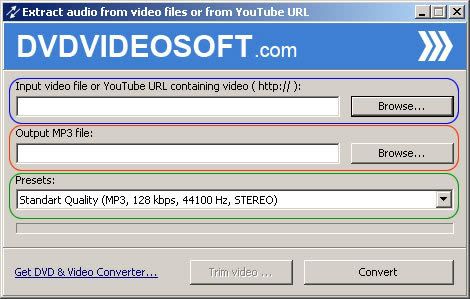
Convert the downloaded flv file to mp3. I suggest to use the DVDVIDEOSOFT's Free Video to Mp3 Converter. Download and install the software. To convert the file, click on Browse under Input video file, you can also specify the file output location if you want, and click on Convert.
That’s it.